Introducing Save Route Feature on YoMetro
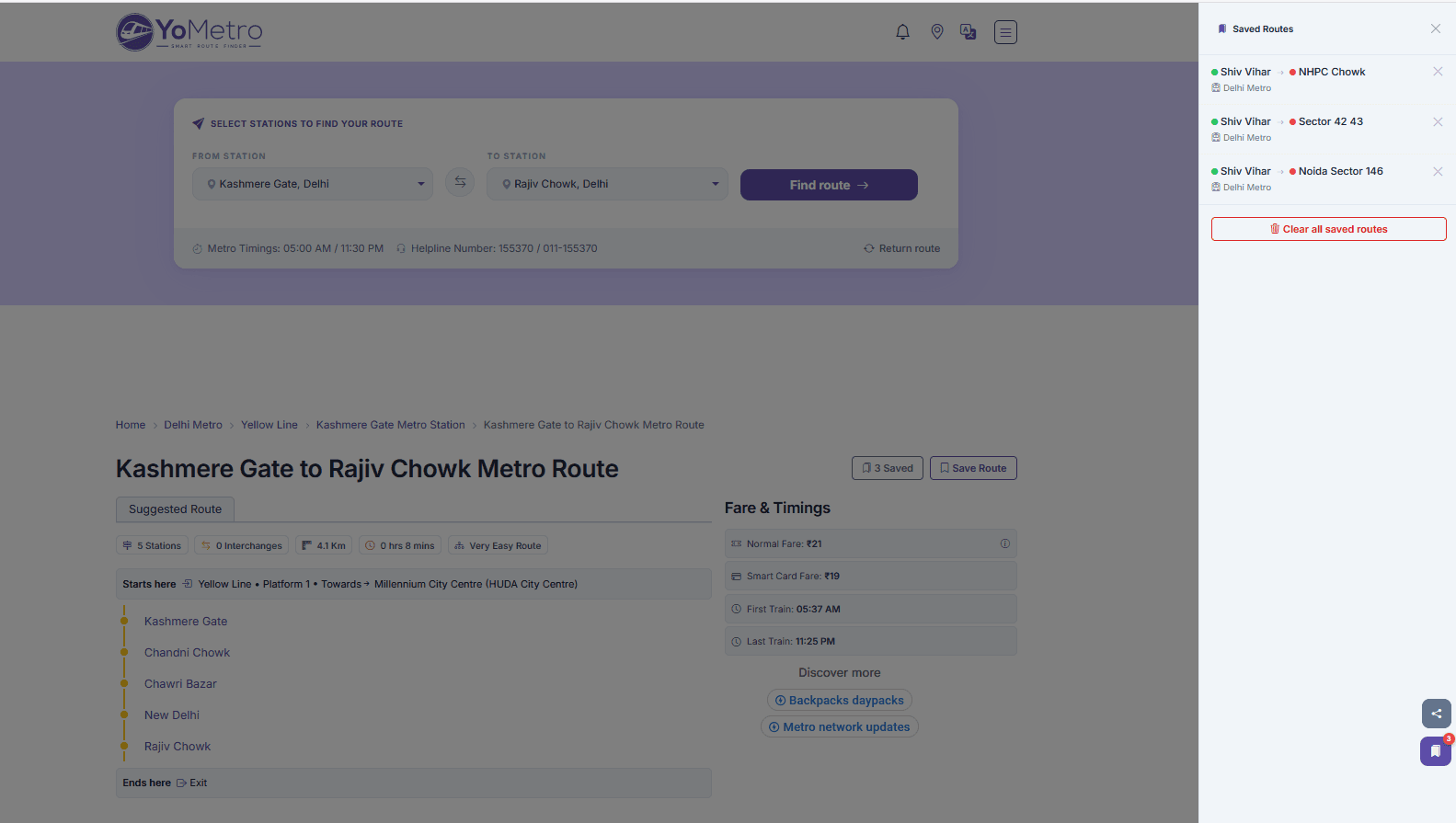
YoMetro's new Save Route feature lets you bookmark any metro route instantly.
Planning a commute or exploring a new city usually means hunting through the same pages over and over. We built Save Route to fix that. With one tap you can bookmark any route on Yometro and come back to it any time – no account, no sign-up, no password to remember.
What Is Save Route?
Save Route is a login-free bookmarking feature built into every route page on Yometro. When you find a journey you use regularly – say, Rajiv Chowk → Huda City Centre on Delhi Metro – just tap the bookmark icon next to the route title. The route is saved to your device instantly.
Next time you open Yometro, your saved routes are waiting for you in a single tap, no matter which page you land on. The counter badge tells you exactly how many routes you have saved at a glance.
How It Works
We designed Save Route around one rule: zero friction. Here is what happens under the hood:
- Instant save. Your route is stored in your browser's local storage the moment you tap the button. No server round-trip, no waiting.
- No login required. There is no account to create and no personal data collected. The feature works for every visitor, first-time or returning.
- Persistent across visits. As long as you use the same browser and device, your saved routes stay put – even after closing the tab or restarting your phone.
- Works on all networks. Delhi Metro, Mumbai Metro, Kolkata Metro, Hyderabad Metro, Bangalore Metro, Chennai Metro, and every other network on Yometro is supported.
Accessing Your Saved Routes
A floating bookmark button sits on every page of Yometro – you will spot it on the right side of your screen, just above the share icons. The button shows a live count of how many routes you have saved.
Tapping the button opens your saved routes panel. From there you can:
- Jump directly to any saved route with one tap.
- Remove individual routes you no longer need.
- Clear all saved routes in one go if you want a fresh start.
On a route page specifically, the panel opens as a slide-in drawer so you never lose your place in the journey details.
Why No Login?
We looked at how people actually use a transit app. Most sessions are short, purposeful, and repeated – you need the same handful of routes every day. Forcing a sign-up just to save a bookmark adds a wall exactly where speed matters most.
By storing routes locally on your device we removed that wall entirely. Your data stays on your device, under your control, with no account to manage.
Tips for Getting the Most Out of Save Route
- Save your daily commute first. Open your regular route, tap the bookmark icon, and it is two taps away from anywhere on the site from now on.
- Save routes before you travel. If you are visiting a new city, bookmark the routes you plan to use while you have Wi-Fi so you can pull them up instantly on the go.
- Use it on mobile. Add Yometro to your home screen and your saved routes act like a lightweight transit shortcut app – no app store download needed.
- Clear and refresh when you want. Finished a trip or changed your commute? Hit "Clear all" and start a fresh list in seconds.
What's Next
Save Route is live right now across all metro networks on Yometro. We are already watching how routes get saved across cities to understand which journeys matter most to our users – that insight will shape the next round of improvements.
We would love to hear how you use it. If you have a suggestion or spot something that could be better, reach out through the feedback option on any route page.
Happy commuting. 🚇
Try it now: Open any route on <a href="https://yometro.com" target="_blank" rel="noopener">yometro.com</a> and tap the bookmark icon to save your first route.